I have some quirks to work out, but for the most part, the new computer is at full functionality for tax season. Neither printer will work, one because it's just flat out not compatible with Windows 7 because it's too old, and the other for some unknown reason. The second one is really the scanner, and it is supposed to be compatible with Windows 7, but in spite of downloading and installing the updated drivers, it still won't talk to the computer. Dell won't help unless I pay them because the printer is out of warranty. I thought that was a bit crappy since it's the new computer that is the problem and that is most definitely IN warranty. Oh, well. I can run both with the laptop, so on the rare occasion that I need to print, or if I need to scan something, I will hook up the laptop, do what I need to do and transfer the data to the desktop via a flashdrive. After tax season I will look into purchasing a new scanner/printer/copier. I never really loved the one I have, and a new one shouldn't have any compatibility issues, so it isn't a huge tragedy or expense to have to purchase a new one.
I did get a trial version of my paperless software downloaded that I can use for 45 days, presumably long enough to finally get a call back from the company as to what to do with my license, so that was far more important. I am paperless for both work and home, so that software effectively IS my printer and without it, I was lost. I use it multiple times a day, many times multiple times an hour, so it was like missing a limb. I suspect I will be forced to purchase a new license even though I have a fully paid license already that is trapped on the old computer, but again, a worthwhile expense at this point.
Email for work came back fully restored and then some. Does anyone know why, when you restore an Outlook file, that everything you have filed in folders, also reappears in your in-box? I had to delete almost 3000 extra messages from my in-box. That was a pain, but I'd rather have too much data than too little. I have one other problem with Outlook to solve after tax season, but for now, I will just deal with it. New emails from all 3 work email addresses are coming in fine as well. If my paperless software is like one of my limbs, Outlook is too, as that's how my clients send me everything. So now I've got all of my limbs back! Yeah!
The home email is another story. For those of you who use Outlook Express, be aware that the program no longer exists in Windows 7. It has been replaced by a program called Windows Mail, or something like that if that's not the correct name. Supposedly you can import your Outlook Express file, but I haven't tried it. I haven't even set up the Windows Mail as I can access my home email remotely and I've been so focused on getting the work stuff back in order that I haven't even tried doing anything with the home email.
Showing posts with label Computer. Show all posts
Showing posts with label Computer. Show all posts
Saturday, January 30, 2010

Wednesday, January 27, 2010
How I've spent the last 3 days
I've been absent from the blogging world for the past few days and you all probably thought I had my head buried in tax returns. I wish. Just for the record, you will NEVER hear me wishing to be working on tax returns unless I'm doing something far, far, worse...which I was.
After my lovely quilting day on Sunday, I traveled, with a spring in my step (not really - let's keep it real here, folks), across the house to my home office, ready to get to work for the week. At the time I had in excess of 20 tax returns in for preparation, plus 1099's to prepare, and I needed to get back to work on them. More returns have come in this week. The short version of Monday's events is that I spent the entire day trying to get this lovely piece of equipment back to a quality of life that was acceptable to us both.
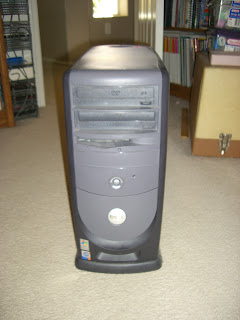

After my lovely quilting day on Sunday, I traveled, with a spring in my step (not really - let's keep it real here, folks), across the house to my home office, ready to get to work for the week. At the time I had in excess of 20 tax returns in for preparation, plus 1099's to prepare, and I needed to get back to work on them. More returns have come in this week. The short version of Monday's events is that I spent the entire day trying to get this lovely piece of equipment back to a quality of life that was acceptable to us both.

Unfortunately, by 5 p.m., it was apparent that it was not to be. I was in a bit of a panic at that point as this is tax season after all, and that computer is how I connect to the server to do my work. Fortunately, data loss was a non-issue as I have both an on-line backup as well as an external hard drive, but the operating system was clearly not going to function properly without repair. The computer is 5 1/2 years old, so the best course of action at this point was to completely replace it with something reliable for tax season and worry about fixing it later.
So, yesterday afternoon, I picked up this lovely piece of equipment. It's a Dell Studio XPS 8100 with an Intel i7 processor, 8 GB of RAM, a 1 TB hard drive and souped up graphics to handle the multiple monitors I use. I really like it so far and it runs so quietly that I have to put my ear right next to it to even hear that it's on.
I spent last evening getting software installed and today it has been restoring my data. I had planned to have the data restored overnight while I was sleeping, but unbeknownst to me, the computer was set to go to sleep after 2 hours of non-activity, not including internet transmission, so it went to sleep not long after I did! It has been restoring all day and is almost done. I've tested some of the restored data and it is perfect, but the real test will be when I try to open the email files. Fingers crossed that they will all be there. I'm off now to get the printers installed. If that goes well, and email is fine, I'm hoping to be back in almost full action by tomorrow. I am still trying to get one program installed, but I have a work around I can use if I can't get it going. Lost productivity at this time of year is not a good thing and I think there will be some long days ahead to catch up. BUT, no data loss is the most important thing, and that's all that really matters to me at this point.
Subscribe to:
Posts (Atom)
